> For the complete documentation index, see [llms.txt](https://hinkal-team.gitbook.io/hinkal/llms.txt). Markdown versions of documentation pages are available by appending `.md` to page URLs; this page is available as [Markdown](https://hinkal-team.gitbook.io/hinkal/hinkal-pay/receive.md).
# Receive
Receive crypto privately from any wallet, exchange, or payment provider.
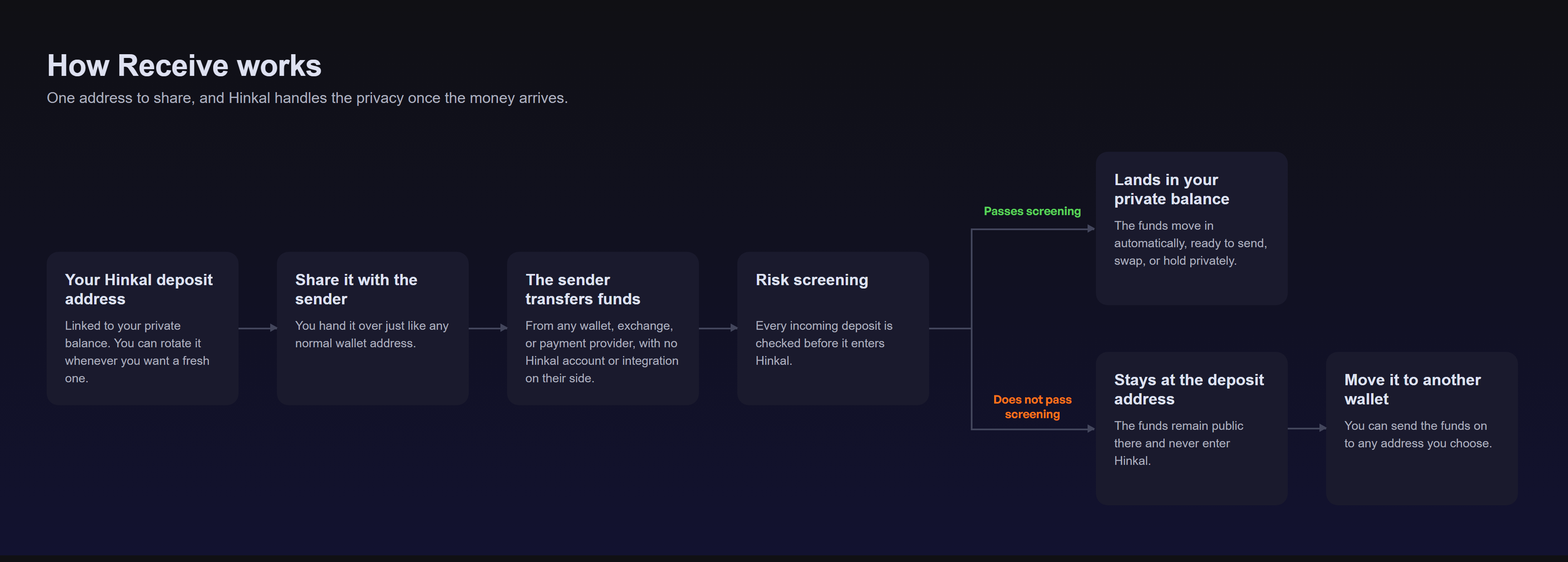
Hinkal gives you a deposit address linked to your private balance. Share it like a regular wallet address. The sender makes a normal on-chain transfer, while Hinkal handles screening and shielding after the funds arrive.
The sender does not need a Hinkal account, does not connect their wallet to Hinkal, and does not need to integrate or interact with Hinkal smart contracts.
***
### **Your deposit address**
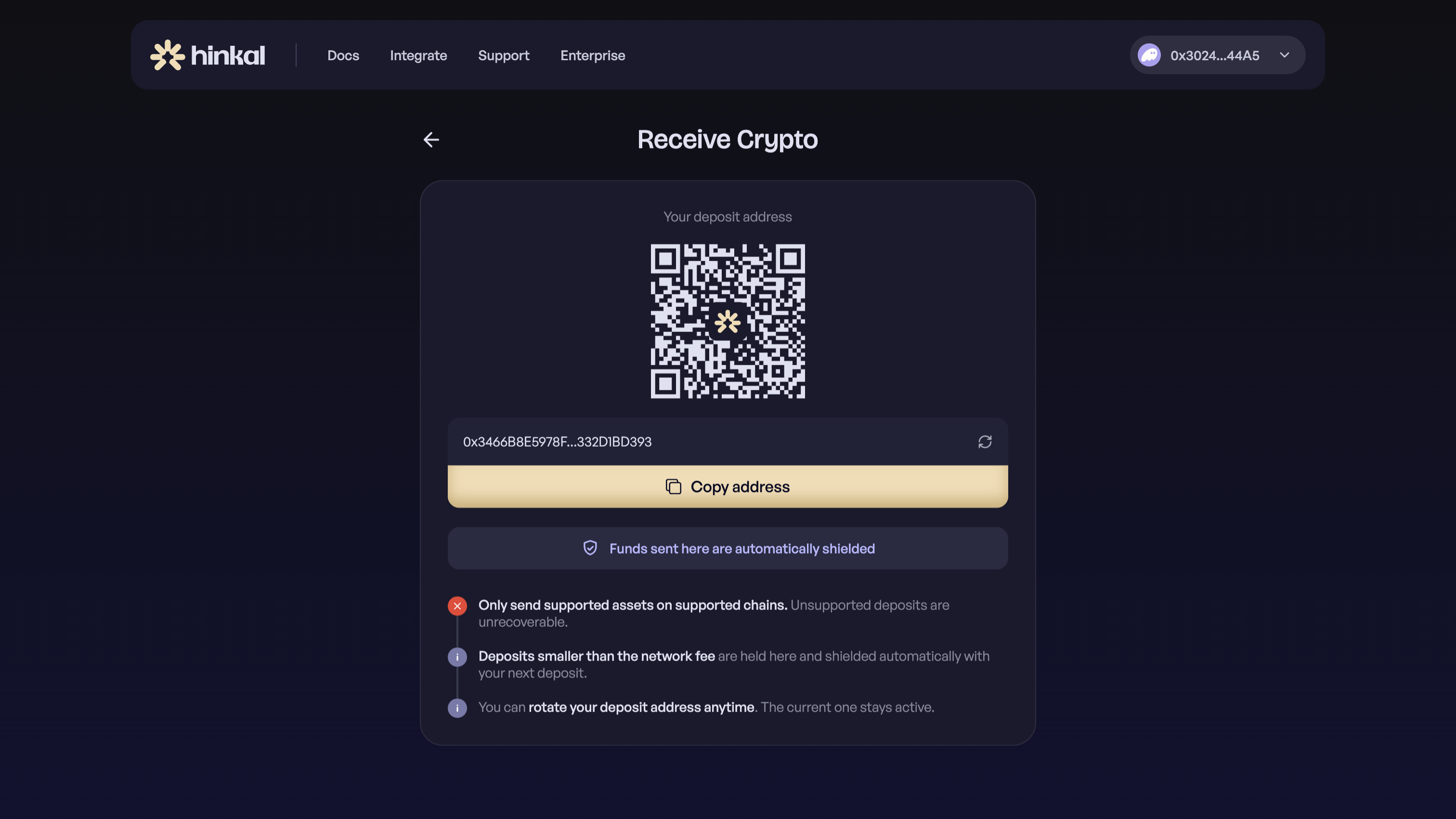
Your Receive page shows your current deposit address.
It works like a regular wallet address: **copy it, share it, reuse it**.
The address is linked to your private Hinkal balance, so you do not need to share the wallet address you use to access Hinkal. The payer only sees the deposit address you give them.
Once an eligible deposit arrives, Hinkal screens it and automatically moves it into your private balance. There is no separate [shielding](/hinkal/hinkal-pay/shield-and-unshield.md) step for you or the sender.
***
### **The sender just sends normally**
A payer can send to your deposit address from:
* a self-custodial wallet
* a centralized exchange
* a payment provider or PSP
* a treasury wallet
* another platform that supports withdrawals to a wallet address
From their perspective, it is a normal on-chain transfer.
They do not need to:
* create a Hinkal account
* open Hinkal Pay
* connect a wallet to Hinkal
* interact with a Hinkal smart contract
* integrate with Hinkal
***
### **How to receive**
{% stepper %}
{% step %}
### Open Receive at pay.hinkal.io
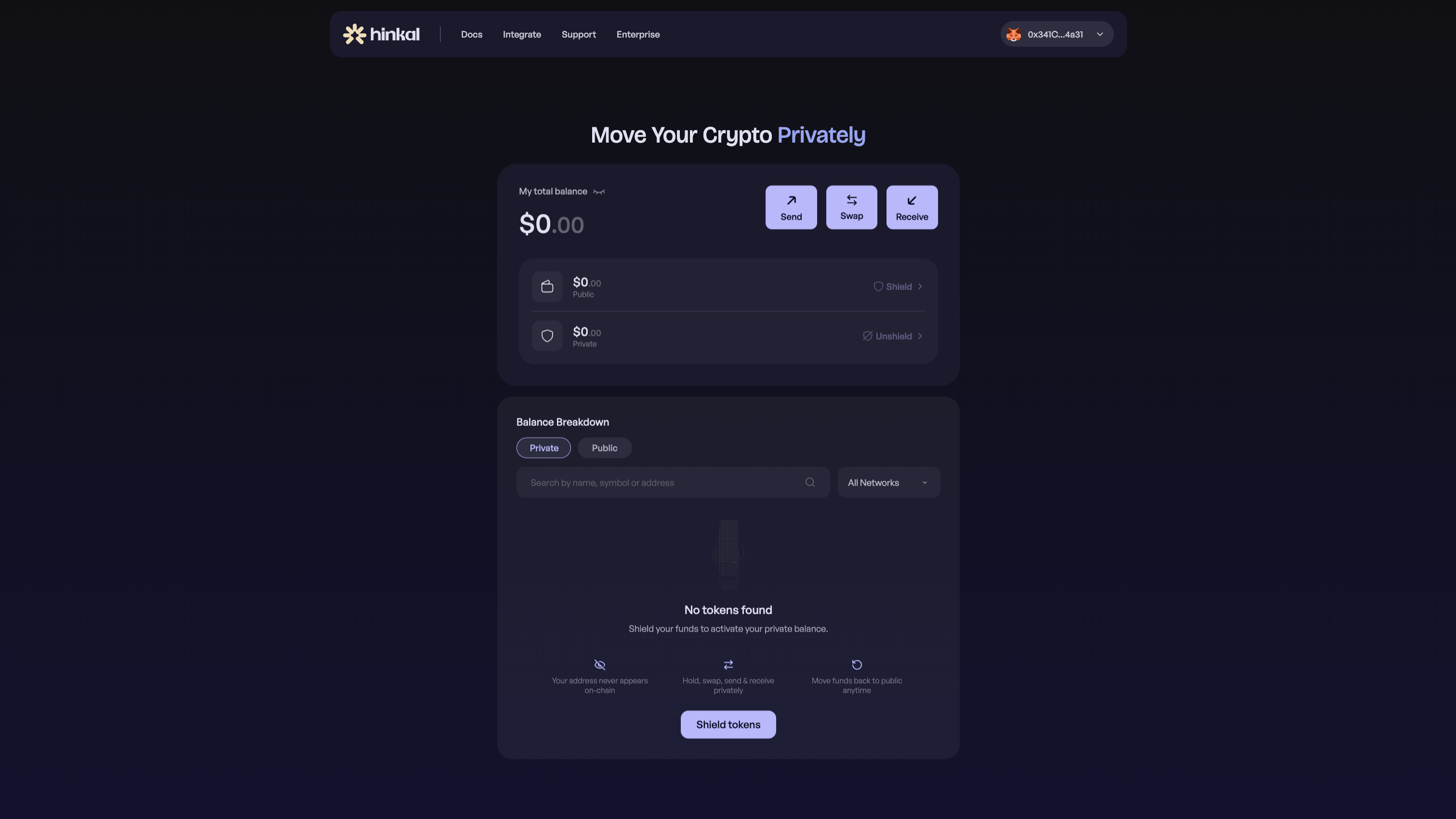
Connect your wallet and click **Receive**. See [Getting Started](/hinkal/hinkal-pay/getting-started.md) if you have not connected yet.
{% endstep %}
{% step %}
### Copy your deposit address
Click **Copy address**. You can also rotate the address from this page.
{% endstep %}
{% step %}
### Share it with the payer
Send the address to the payer, or enter it as the withdrawal address on an exchange or payment provider.
{% endstep %}
{% step %}
### The sender transfers a supported asset on a supported network
The transfer is a normal on-chain send. See [Supported Chains](/hinkal/ecosystem/supported-chains.md).
{% endstep %}
{% step %}
### Hinkal screens the incoming deposit
Every deposit is checked before it can enter your private balance. See [Compliance](/hinkal/security-and-compliance/compliance.md).
{% endstep %}
{% step %}
### Eligible funds move into your private balance automatically
If the deposit passes screening, it is shielded with no extra step from you or the sender.
{% endstep %}
{% endstepper %}
{% hint style="warning" %}
Only send supported assets on supported chains. Unsupported deposits are unrecoverable.
{% endhint %}
{% hint style="info" %}
Deposits smaller than the network fee are held here and shielded automatically with your next deposit.
{% endhint %}
{% hint style="info" %}
You can rotate your deposit address anytime. The current one stays active.
{% endhint %}
***
### **Where Receive is useful**
The main advantage of Receive is that the sender does not need to interact with Hinkal for you to receive privately. That makes the same deposit address useful across several payment flows.
#### Get paid by any counterparty
Share your deposit address with a client, customer, partner, contractor, or anyone else who needs to pay you.
They send from their existing wallet as usual. You do not need to ask them to use Hinkal or change how they make the payment.
This can be used for:
* client payments
* invoices
* contractor payments
* B2B settlements
* treasury transfers
* payments between counterparties
#### Withdraw from exchanges directly into your private balance
Use your Hinkal deposit address as the withdrawal destination on a supported centralized exchange.
Instead of:
**Exchange → Public wallet → Hinkal**
you can use:
**Exchange → Deposit address → Private balance**
The exchange makes the same type of withdrawal it already supports. No Hinkal integration is required on the exchange side. Eligible deposits are screened and moved into your private balance automatically.
#### Receive withdrawals and payouts from payment providers
Your deposit address can also be used as a withdrawal or payout destination on payment platforms and PSPs.
This is useful for merchant settlements, platform balances, contractor payouts, or other flows where the provider already lets the recipient specify a wallet address. The provider does not need to add Hinkal to its transaction stack.
#### Screen incoming funds before they enter your private balance
With Receive, incoming funds first arrive at a deposit address and are screened before they can enter your private balance.
**If the deposit passes screening**
The funds are automatically moved into your private balance. They are then available to [send](/hinkal/hinkal-pay/send.md), [swap](/hinkal/hinkal-pay/swap.md), or hold privately.
**If the screening returns a high risk score**
The funds are not moved into your private balance. They remain at the deposit address as public balance and can be handled separately, or moved to any other public address.
This gives you a buffer between unknown inbound transfers and the private balance you use for your activity inside Hinkal.
***
### **What happens when funds arrive**
Every incoming deposit is screened before it is moved into your private balance. There are two possible outcomes:
| Deposit status | What happens |
| ---------------------- | ------------------------------- |
| Passes screening | Shielded into private balance |
| Doesn't pass screening | Stays public at deposit address |
{% hint style="info" %}
If a deposit does not pass screening, the funds are still yours. Use **Send to another wallet** to move them to another address. See [Send](/hinkal/hinkal-pay/send.md) and [Compliance](/hinkal/security-and-compliance/compliance.md).
{% endhint %}
***
### **Small deposits**
Moving funds from the deposit address into your private balance requires a network fee.
Deposits smaller than the network fee are held at the deposit address and shielded automatically with your next deposit.
***
### **Rotate your deposit address**
You can generate a new deposit address at any time. The current one stays active.
This means you can give a new address to future senders without breaking an address you have already shared with someone else.
Rotation can also be useful when you want to:
* use a fresh address for a new payer
* separate deposits from different counterparties
* avoid reusing the same public deposit address longer than necessary
All active deposit addresses remain linked to your private Hinkal balance.
***
### **Supported assets and networks**
Only send supported assets on supported networks to your deposit address. Always confirm that both the asset and network are supported before sending.
See [Supported Chains](/hinkal/ecosystem/supported-chains.md).
{% hint style="danger" %}
Unsupported deposits are unrecoverable.
{% endhint %}
***
### **What stays private**
The payer sends to your Hinkal deposit address, not directly to the wallet you use to access Hinkal.
After an eligible deposit passes screening, it is moved into your private Hinkal balance automatically.
This lets you receive funds without giving every payer your connected wallet address and without requiring the payer to interact with Hinkal.
See [How It Works](/hinkal/hinkal-pay/how-it-works.md) for the on-chain behavior behind this.
***
### **Receive at a glance**
| Situation | Result |
| ---------------------------- | ------------------------------- |
| Passes screening | Moved into private balance |
| Doesn't pass screening | Stays public at deposit address |
| Smaller than the network fee | Shielded with your next deposit |
| Unsupported asset or network | **Unrecoverable** |
| Address is rotated | Previous address stays active |
***
### **FAQ**
Does the sender need Hinkal?
No. The sender makes a normal transfer to your deposit address using their existing wallet, exchange, or payment provider.
Can I receive directly from an exchange?
Yes. Use your active Hinkal deposit address as the withdrawal destination, provided the asset and network are supported.
Can a payment provider send directly to my deposit address?
Yes. If the provider allows withdrawals or payouts to a wallet address, your Hinkal deposit address can be used as the destination on a supported network.
Do I need to shield received funds manually?
No. Eligible deposits are shielded automatically after they arrive and pass screening. Manual shielding is only for assets you already hold in your public wallet. See [Shield & Unshield](/hinkal/hinkal-pay/shield-and-unshield.md).
What happens if a deposit does not pass screening?
It does not enter your private balance. It remains available as public balance at the deposit address and can be sent to another wallet. See [Compliance](/hinkal/security-and-compliance/compliance.md).
What happens if the deposit is smaller than the network fee?
It stays at the deposit address and is shielded automatically with your next deposit.
Can I reuse my deposit address?
Yes. Deposit addresses do not expire. You can keep using the same one, or rotate it anytime.
Can I get a new deposit address?
Yes. You can rotate your deposit address at any time.
What happens to the old address after I rotate it?
It stays active. Rotating creates a new address without turning the previous one off.
Does the payer see the wallet I use to access Hinkal?
No. The payer sends to the deposit address you share with them.