Protecting Your Tokens
Making sure you don't lose tokens in different instances
Never use these addresses to receive tokens
This is Hinkal’s smart contract address: 0x7cb60446d7635C68EDf1c568cac74A1f98c1Cfa4
These are Hinkal’s relayer addresses: 0x0a0e05B6375a61D345173d90Cf7c8bd81E76445c, 0xB8D5E90d8Baf0650e5b9D6bb988c6dd206F4BaaD
It’s a contract that holds everyone’s private funds.
If tokens are sent there with a regular on-chain transfer, the relayer (which handles all transactions going in and out of the smart contract) will not be able to identify the recipient, resulting in lost funds.
Hinkal cannot reverse these transactions and is not liable for lost funds.
Anything you copy from a Blockchain scanner, a 3rd party dApp console, or elsewhere places you at risk of losing tokens.
Only use addresses from inside Hinkal
Always receive funds using:
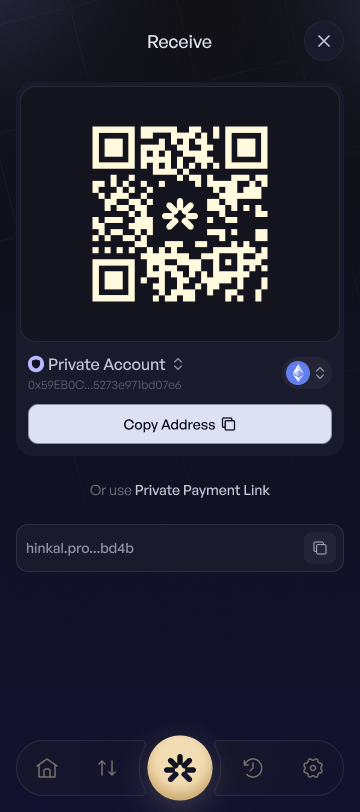
Private Account → Receive QR Code / Copy Address / Private Payment Link

Public Account → Receive Copy Address

You can switch between accounts in the Receive screen:

Scenario 1: On-ramp with wallet connection
The on-ramp sees the Private account, so it pays the contract itself. Funds have no owner and will never appear in your Private balance.
Connect your Public account instead. The Public account can accept regular on-chain transfers, just like any Ethereum address. Copy the address from the 'Receive' screen.

Scenario 2: On-ramp that asks for an address
(no wallet connection step, paste address)
You paste a smart contract address / private address.
Tokens stranded inside the contract, lost.
Public address from Receive → Copy Public address

Scenario 3: Someone sends to the contract address
If you share the contract’s 0x… string with a friend, their standard ERC-20 transfer will drop tokens into the contract with no recipient. Funds lost.
Share to sender:
Private Account: Private Payment Link, QR Code, or Private Address from 'RECEIVE' screen.
Public Account: Public Address from 'RECEIVE' screen
Scenario 4: KYC or identity checks on dApps
Completing KYC with the Private account links your real-world info to the privacy contract. Always switch to a Public account before submitting personal details.
Steps to stay safe
Open extension → switch on top left bar → Public.
Confirm the top-right badge shows Connected next to Public.
Proceed with the dApp’s KYC flow.
Quick Checklist before receiving or on-ramping
Receiving? Copy the address from Receive inside Hinkal - never from a block explorer.
On-ramp? Use the Public address or connect with the Public account.
KYC? Public account only.
Friend paying you? Send them your Private Payment Link, QR code, or Private Address or Public address.
Never paste or share addresses from a blockchain scanner or dApp
Last updated